Posts

Showing posts with the label 1:1 Chromebooks

VoiceThread... Continued!

Image
 Putting the Google Slides you already have into VoiceThread to increase student engagement! Last month Brian Heyward shared great information and research about the benefits of using VoiceThread in your classroom. But wait… you don’t have to start from scratch! you can import the great Google Slide decks you have already created? It’s as easy as…

DyKnow for Teachers (in MobileMind!)

Image
  Most teachers had the opportunity to explore MobileMind during Richland 2 in-service days. This month we are highlighting the DyKnow courses offered in MobileMind. What is DyKnow? DyKnow is a district-paid-for resource to help teachers manage and engage students in a 1:1 classroom. From the teacher side of DyKnow you can: monitor student usage (and get reports, too!), create blocking plans to help students stay on task, and even ask students check-in questions that magically appear right on their screen!  Three courses to check out on MobileMind include:

Move over EdPuzzle, Welcome Discovery Education Video Quiz

Image
  If you haven’t been to Discovery Education in a while, it’s time to go in and get check it out again. They have really revamped their website adding different types of media, and readymade created activities to engage your students in their own learning, to virtual field trips. I can go on and on about the new updates. We will get into those resources in later posts, I want to focus on the video quiz feature Discovery Education now has. If you are familiar with using EdPuzzle, there will not be a big transition for you, as the process of creating and assigning a video quiz is similar. I think the biggest benefit of using Discovery Education, over EdPuzzle, is the fact it is free and you have unlimited storage space. EdPuzzle’s free basic plan allows you to store up to 20 videos before you have to pay for more storage. For our friends in our district, you would access Discovery Education through Classlink.  Once you’re in Discovery Education, you will click on the Quiz tile ...

Devices are not a distraction

Teaching in a 1:1 environment is truly a great opportunity for both you and your students. It allows for immediate access to the most recent information, endless opportunities for students to create and demonstrate their understanding of the concepts, as well as personalizing the learning for your students. However, I am often hearing that the devices are becoming a distraction. Students become off task and are on websites or apps that are either inappropriate or unwanted at the time. The first instinct for the teacher is to take the device away. However, it is a learning tool, just as a paper, pencil, and book are learning tools. We certainly do not take those away from our students. We deal with the behavior, redirect students to get back on task and reinforce to use the device appropriately. So, over the break, I took an opportunity to read a book called Classroom Management in the Digital Age: Effective Practices for Technology-Rich Learning Spaces by Heather Dowd and Pat Green. I...

Voices in Tech: How edtech coaches aid classroom instruction

We are excited to share an article from District Administration  featuring our very own Nichole Allmann.  See the excerpt below and be sure to head to the full article to read about all of Nikki's experiences and wisdom.  "A well-trained team of coaches helps teachers manage the potentially overwhelming integration of new technology" By: Emily Ann Brown | August 8, 2019 ...Technology never takes center stage In the coach-teacher partnership. Instead, coaches help teachers examine standards and curriculum, and identify learning goals. They then recommend tools that will facilitate desired outcomes, says Nichole Allmann, a technology integration specialist who oversees coaches at 10 schools... Read the full article here!

Let's Talk Digital Procedures!

Image
In a time-honored “beginning of the year tradition,” teachers are going to start the year off going over classroom rules, procedures, and expectations for the year. They will cover everything from bathroom passes, sharpening pencils, turning in assignments, entering and exiting the classroom along with many other expectations.  How much time will classroom teachers spend talking about their digital expectations for students? With schools moving to a 1:1 environment and more and more students showing up with cell phones, it is time to spend just as much time on students' online behavior as you do on their physical actions.  As the teacher, you establish the culture of your classroom with high expectations for student behavior and student to student interactions, both online and face-to-face.   Because accessing devices for learning is an integral part of teaching and learning in Richland 2, it is important that conversations about behavior and consequences h...

5 ways to use WeVideo in your classroom

Image
Richland Two purchases full student and teacher subscriptions to WeVideo, a cloud-based online video editing software.  You may be thinking video editing doesn’t quite work in your content area if you don’t teach a computer-related content but that’s not the case at all!  Check out five ways you and your students can use WeVideo in your classroom.  Remember, to login and access your full subscription mode, just click “Log In with Google” and sign in with your Richland 2 email account. Teachers, make your lecture digital!   Simply turn on WeVideo’s screen capture feature, present your slide deck on your device, and begin talking!  Give your lecture exactly how you would in class - no need to even worry about sounding perfect (after all, we all make mistakes when we are teaching ‘live’ in front of our kids).  The power of this strategy comes in after producing your video because kids can watch the video multiple times at their own pace,  access t...

Memes in the classroom

Image
Source: http://dailyutahchronicle.com/2015/11/29/a-brief-history-of-memes-and-how-theyre-destroying-our-political-culture/ Everybody loves a good meme.  From teachers to students, these days memes provide a lot of entertainment.  Have you ever thought about assigning memes as student work, though?  Asking kids to make and share memes could get us further in the engagement battle and really the kids are doing much more than creating memes.  See some examples below: My Favorite Mistake Meme So often teachers spend tons of time reviewing student work and providing feedback only to have it be ignored by the kids.  What if you asked students to meme their favorite mistakes?  This would force them to review the work and the feedback, and if you as a teacher only identified where the mistake was rather than what the mistake was, it could force them to do some focused error analysis.  Teachers can then anonymously share memes that addre...

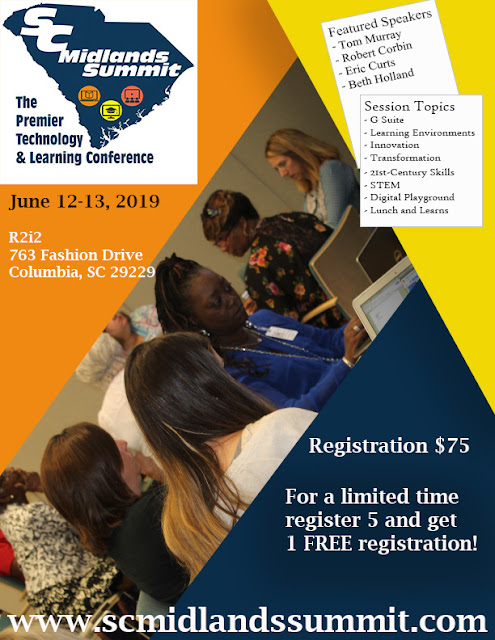
SC Midlands Summit is June 12-13, 2019

Image
Come join us for 2 days of fun and learning. $75.00 for 2 days.  Districts - if you purchase 5 registrations, get the next registration for FREE! Go to www.scmidlandssummit.com for more information.  

Digital Strategies to Make Learning Visible

Image
Gone are the days that students must memorize facts, dates, and people. Nowadays most educators would agree they want their students to not only “know” the information but be able to do something with the new knowledge. Simply put, students need to be able to critically think about the content and put it into application. However, as a veteran educator or even a novice educator, what does that type of “active” learning look like? It was certainly not how we learned when we were going through school, nor did our colleges prepare us for this type of teaching. I want to share a few strategies that can be applied in any subject and any grade, though you may need to modify them to meet the needs of your students in order to get your them critically thinking about the subject matter. “ Tweet This ” Bring the idea of social media tools to help students formulate their own understanding or opinion on a topic they are learning. At the end of your lesson, ask students to create a “tweet” r...