
Posts

Showing posts with the label internet safety

Getting parents up to date with technology

Image
What is your school doing to inform parents of internet safety, media balance, and learning with technology? What are you doing, as an educator, to provide ongoing information so parents are learning how to “monitor” their child(ren)’s technology use at home? Just as we did not grow up in the digital age, the parental community in each of our schools did not either. They are just as unequipped and unaware as we are when it comes to digital citizenship. As an educator, it is imperative we are knowledgeable and stay up to date with how to develop our students to be responsible online users. Much of what we do with our students is online and can be overwhelming, ensuring they make the right choices and be informed users of the internet. Many of our students are currently developing an online reputation that will impact their future. Just as we are learning how to teach this to our students, parents need to learn what steps they can take to keep their child(ren) safe and...

New and Revised Curriculum for Digital Citizenship

Image
https://www.commonsense.org/education/digital-citizenship/curriculum One of the critical areas we, as educators, focus on daily with our students is being a responsible citizen in our society. We work on building character skills on a daily basis in various ways, whether it is circle time/morning meeting, community building activities or reteaching those quick lessons when students need a “refresher” on those good habits of mind. The question is, how do you implement the learning required for students to be responsible “digital” citizens? So you know where to start? Common Sense Media has recently released some new and revised lesson plans that are FREE and completely ready to use. Here are some highlights of what you can find on their website: Lessons are organized based on revised topics under the big umbrella of “Digital Citizenship” . This list also reflects the new “scope & sequence” where the first topic is more general, progressing to a more complex topic. ...

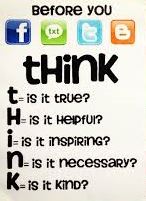
"THINK" Before You Post

Image
Are you aware of the digital footprint you are leaving when you go online? Think about the last thing you did on the internet. Was it a post on Facebook, Twitter or Instagram? Were you shopping on Amazon or another online store? Maybe you were searching for a recent news story that you had heard about on your way to work/school this morning. Whatever the action was, it left a digital footprint that can be traced, searched, copied and shared by anyone. So why is knowing your digital footprint critical? Because it can impact your future no matter your age. The content you post or share online can potentially change a person’s perception of you. Students who apply to join school clubs, athletic teams or even moving onto college could lose an opportunity if a digital footprint was misconstrued or misrepresented their personal image. It can impact a new job whether you are trying to advance in your current career or change careers altogether. Future employers can search your name and lear...

Talk to Your Kids about Internet Safety

This post is going to be a bit more personal than other ones we have written because of the topic-internet safety. I am a mother of 2 children, a   daughter and a 10-year-old son who LOVES to play on his PS4. At first, the notion that my child can be playing games with anyone in the world, at any time, freaked me out and I work in the world of technology. In the classroom, I always embraced the idea of seeing my students have opportunities to connect with like-minded people who could challenge their thinking, dig deeper into their thought process and have a more meaningful authentic learning experience. I truly believe the best ways for our students, and even my own children, to learn internet/online safety is to give them opportunities. While we set up my son’s account, and you better believe we did this together, I talked through and modeled the process of setting up his account. We used a fun screen name... not his real name . We used his personal email that is attached t...