Posts

Showing posts with the label digital tool

Join the National Movement: Digital Learning Day
Image
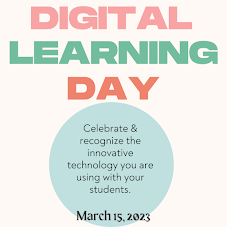
  Let's celebrate the power of technology in education by participating in Digital Learning Day on March 15, 2023 . This day highlights the potential of technology to transform teaching and learning, and the impact it can have on student success. By embracing digital learning, we can provide students with engaging and personalized learning experiences, and prepare them for the digital future. This day is also for you - to be recognized and celebrated for the effective use of digital tools in your classroom. Here's how you can get involved: Plan a lesson incorporating technology. Try something new that you have heard about but just have not had the chance to try yet. If you are not sure where to start, partner with your Technology & Learning Coach, a fellow colleague, or brainstorm with your students. They will have a variety of ideas to share. Showcase Day - Provide an opportunity for your class to showcase their digital skills. Our students come to us with many talents a...


A Few Sweet Things About Pathblazer

Image
Whether you're just getting started using the platform, or you've been in for a while, watch this to see a few things that you may want to know about using Pathblazer. 

Move over EdPuzzle, Welcome Discovery Education Video Quiz

Image
  If you haven’t been to Discovery Education in a while, it’s time to go in and get check it out again. They have really revamped their website adding different types of media, and readymade created activities to engage your students in their own learning, to virtual field trips. I can go on and on about the new updates. We will get into those resources in later posts, I want to focus on the video quiz feature Discovery Education now has. If you are familiar with using EdPuzzle, there will not be a big transition for you, as the process of creating and assigning a video quiz is similar. I think the biggest benefit of using Discovery Education, over EdPuzzle, is the fact it is free and you have unlimited storage space. EdPuzzle’s free basic plan allows you to store up to 20 videos before you have to pay for more storage. For our friends in our district, you would access Discovery Education through Classlink.  Once you’re in Discovery Education, you will click on the Quiz tile ...

Capture your students' attention with images

Image
How do you introduce a new unit or any lesson to capture the attention of your students? Do you pose a question? Was it creative and unexpected? Maybe it was a simple review of what they learned in the previous lesson. There is a purpose of hooking your students for that fresh learning and setting the objective for each lesson. It can help activate prior knowledge, set the learning expectations and allow students to make connections between the content and real world. The use of images can be that creative and unexpected way to capture your student’s attention with the anticipation of new learning. Strategy 1 - Half the picture Locate an image that shows a big idea of the unit or lesson. Make a copy of the image in order to edit using a photo editing tool to cover half of the picture. Display the image that only shows ½ of the picture. Using the 3-2-1 strategy, a great AVID strategy, have students organize their thoughts about what they think is happening in the picture. ...

Google Keep Can Keep You Organized

Image
Have you ever needed to take notes or create a list quickly?  If the answer is YES!, then Google Keep is the tool for you and your Student  Google Keep allows you to take notes on the fly from any device with the app or internet access.  Haha, did you get the pun “fly?” It is supported on every platform, IOS, MAC, Android, Chromebooks, and Windows.  Keep is integrated into the sidebar and Tools menu of Docs, Sheet, and Slides. Notes you create on your cell phone can be accessed on your computer or any other device that has the Keep app. You can even create a note by recording your voice.  Also, you can color-code notes, create categories for your notes, add an image, take pictures, create a drawing, create a checklist, assign a reminder date and the best is you can share them with others, brilliant! Google Keep is an excellent AVID organization tool for your students as well.  Students can keep vocabulary and spelling lists handy for review o...

Visible thinking with texts - Prism

Image
When I taught biology, I frequently assigned articles for my students to read. .  Using a variety of texts beyond the adopted textbook helped make the subject more accessible for my students because I was able to choose topics that were far more engaging than the typical informational text found in the heavy and dense biology book.  I would circulate the room as they read, hoping to ascertain a smidge of what they were thinking as they read - such a futile strategy.  Eventually, we developed some reading codes they were to use as they read so that I could peak into the margins of the article and catch a glimpse of their annotations.  Figuring out how to quickly extract the common themes in their annotations was hard, though, when working with 30 or more students reading at varying paces. This is an opportunity where the right technology can really benefit the students and the teacher.  Using a tool like Prism , the teacher is able to assign highlighter colors ...

Checking Student Understanding During Instruction

Image
Quick formative assessments provide educators with valuable insights that can be used to modify or improve lesson plans, adjust teaching methods, and, ultimately improve student learning. Ultimately, the goal of formative assessments is to:  provide day-to-day feedback that can be applied immediately provide useful information about what students have learned with minimal time or effort allow educators to address student lack of understanding or misconceptions quicker help to fosters the notion that teaching and learning are on-going processes.  Technology makes the process of creating assessments and collecting the information much more simple and a much faster turn around. Here are a couple of suggestions to get you started.  DyKnow: This is a cloud-based management system the district has purchased for our teachers this year.  A favorite feature of mine is the ability to push out a quick question to all my students in that class and have immediat...

Understanding Cyberbullying

Image
We recently wrote a blog discussing the importance of creating digital learning spaces with our students. These relevant and meaningful ways of communicating online assist our students in learning to be responsible and effective communicators no matter the tech tool used. We want students to understand that the internet provides opportunities for connecting with like-minded people and collaboratively learning with others. We always hope that our students and children use good judgment when they are online, however, there are times when comments are posted that are hurtful and meant to humiliate another person. What is cyberbullying?  As defined by Common Sense Media , the use of digital media tools to deliberately humiliate and harass others often and deliberately. Cyberbullying is similar to face to face bullying. It can be harassing someone, pretending to be someone, or spreading rumors. The use of online tools enhances the embarrassment because it becomes more pub...

2019 Film Festival Begins

Image
Each year, Richland Two provides a unique opportunity for students and district staff to share their story through video creation. We are excited to be in our 6th year and know it will be a bigger event this year. Our window of opportunity begins on September 10th, where   students can complete the interest form   and  turn in  permission slips . 

Empower Your Students to Responsibly Communicate Online

Image
The beginning of the school year can be overwhelming. From learning new students’ names, establishing norms and classroom rules that students must follow in the classroom to then developing a classroom culture that is safe and conducive to learning, it's no wonder that teachers are unusually exhausted in those first few weeks.  As educators, it is the same “beginning of the year” lecture every time and it is the same presentation for the students every year. Teachers want to ensure students understand what is expected and what a good citizen does in class and school each day. Students practice being a good citizen each day and learn from the mistakes made. When an unacceptable action occurs in the classroom, at lunch or during recess teachers take that moment as a learning opportunity to correct it for the future in hopes it won’t happen again. So as I ask you, can we empower our students to learn to be responsible citizens in the digital space by giving them frequent opportuniti...

Adding value to edtech games

A few weeks ago we blogged about the value of online games in the classroom .  Hopefully it inspired some thinking about the purpose, intentionality, and value the games add to the student’s learning.  We know that there are times where some sort of online game works for classrooms so here are some strategies that may ensure higher quality learning.   Connect the game to another learning goal.    If students need to study vocabulary and matching quizlet cards is your only choice, consider providing an activity that requires the students to transfer the learning.  If students must review vocabulary words, assign a follow up paragraph where they use the words in context.       2.  If the game tracks points/time, ask students to reflect on progress.      Asking students to reflect on how they decreased their time to solve math facts or      match words and definitions allo...