Posts

Showing posts with the label assessment

Increase Student Engagement and Motivation with Choice Boards
Image
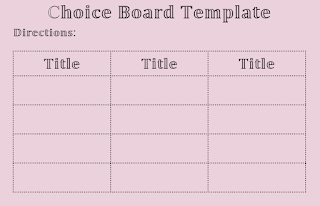
Are  you struggling with getting students to complete classwork or homework? Maybe you are struggling with grading the same assignment 25+ times. Have you considered providing your students a choice in how they engage with the content and demonstrate their understanding? A simple way to provide students with an opportunity to make a choice in their own learning is with a choice board. What are Choice Boards? In a nutshell, it is a board comprised of squares that allow students some choice in their learning. Each square lists an activity students can complete, whether it is a concept or skill. This differentiated approach allows students to learn content or demonstrate their understanding in a way that interests them. Choice boards can be used in any subject and offer a variety of learning contexts for all learners. What are the benefits of using Choice Boards? Choice boards allow students to make their own choices, increasing intrinsic motivation. I am sure you are more motivated ...

Move over EdPuzzle, Welcome Discovery Education Video Quiz

Image
  If you haven’t been to Discovery Education in a while, it’s time to go in and get check it out again. They have really revamped their website adding different types of media, and readymade created activities to engage your students in their own learning, to virtual field trips. I can go on and on about the new updates. We will get into those resources in later posts, I want to focus on the video quiz feature Discovery Education now has. If you are familiar with using EdPuzzle, there will not be a big transition for you, as the process of creating and assigning a video quiz is similar. I think the biggest benefit of using Discovery Education, over EdPuzzle, is the fact it is free and you have unlimited storage space. EdPuzzle’s free basic plan allows you to store up to 20 videos before you have to pay for more storage. For our friends in our district, you would access Discovery Education through Classlink.  Once you’re in Discovery Education, you will click on the Quiz tile ...

SC Midlands Summit

Image
We are excited about this year's SC Midlands Summit lineup. This year we have 2 new featured speakers and 2 returning featured speakers. Here is a peek at their topics they will focus on at the Summit, June 12-13th. There is something for you... Tom Murray, Learning Transformed: 8 Keys to Designing Tomorrow's Schools, Today Leading with Purpose From Research to Practice, How to Create the Learning Spaces Kids Need Tech Tools for Student Engagement and Teacher Effectiveness Robert Corbin Keynote Speaker from Discovery Education - STEM and STEAM Focus Eric Curts Google Tools for Art and Music Education Google Tools for Struggling Students Holy Sheets! Google Sheets activities for all Subjects 360 Degree Learning with Google Tour Creator Googley Activities for Primary Students Awesome Google Drawings in your Classrooms Beth Holland The Pen is NOT Mightier than the Keyboard: Strategies to Embrace & Scaffold Digital...

Visible thinking with texts - Prism

Image
When I taught biology, I frequently assigned articles for my students to read. .  Using a variety of texts beyond the adopted textbook helped make the subject more accessible for my students because I was able to choose topics that were far more engaging than the typical informational text found in the heavy and dense biology book.  I would circulate the room as they read, hoping to ascertain a smidge of what they were thinking as they read - such a futile strategy.  Eventually, we developed some reading codes they were to use as they read so that I could peak into the margins of the article and catch a glimpse of their annotations.  Figuring out how to quickly extract the common themes in their annotations was hard, though, when working with 30 or more students reading at varying paces. This is an opportunity where the right technology can really benefit the students and the teacher.  Using a tool like Prism , the teacher is able to assign highlighter colors ...

Teacher Spotlight: Alesha Love, RVHS

Image
Here at BeyondIntegration we’ve been spending over a year sharing ideas for technology integration in Richland Two classrooms.  We also, however, want to honor and share the significant uses of technology we see teachers implement regularly.  We will begin sharing a series called Teacher Spotlights.  You can find all posts in the Teacher Spotlight series by clicking the tag on the right side of the blog. Teacher: Alesha Love, high school math School: Ridge View High School (where she graduated from as well!) Showcase of technology integration use: On the day before an assessment in Ms. Love’s foundations in Algebra class, Ms. Love worked to engage students in reflecting on their understanding of various learning objectives to be assessed and provide support for students who had gaps in their knowledge. The app Ms. Love chose for this task was quizzizz.com.  This isn’t your average quiz site but rather a gamified version of questions to engage an...

Checking Student Understanding During Instruction

Image
Quick formative assessments provide educators with valuable insights that can be used to modify or improve lesson plans, adjust teaching methods, and, ultimately improve student learning. Ultimately, the goal of formative assessments is to:  provide day-to-day feedback that can be applied immediately provide useful information about what students have learned with minimal time or effort allow educators to address student lack of understanding or misconceptions quicker help to fosters the notion that teaching and learning are on-going processes.  Technology makes the process of creating assessments and collecting the information much more simple and a much faster turn around. Here are a couple of suggestions to get you started.  DyKnow: This is a cloud-based management system the district has purchased for our teachers this year.  A favorite feature of mine is the ability to push out a quick question to all my students in that class and have immediat...

More tips for teacher to student feedback

Image
Previously we shared some ideas for using Google Sheets and Orange Slice Docs rubric to make the process of giving feedback faster for teachers.  Today we are sharing some ways to provide feedback easily using two tools you may already have incorporated into your regular classroom practice. Many teachers use Google Classroom to collect assignments from students.  It certainly helps teachers reduce the amount of papers they carry around and the commenting features within the Google apps makes giving students guidance in their working document very easy.   Still, when you’re working with 30 students per class, the time it takes to open each student’s document and waiting for it to load can add up!  As a result, Google Classroom has released a grading panel that makes navigating through each kid’s document quicker for teachers and the included comment bank makes providing feedback to frequent mistakes a breeze.  Watch this tutorial for more infor...

Differentiating with Technology: part III

Image
This is the last post in our 3 post series on using technology for differentiation.  See the previous two posts here: Differentiating with Technology: Content Differentiating with Technology: Process The last category that is typically explored with technology is differentiating the product .  This is the method that teachers use to be able to determine “did the students get it? ”  Wiggins and McTighe (2005) remind us that it is not that students can acquire knowledge alone - the true measure of learning is about what students can do with their knowledge.  This is where product and differentiation really shine. Differentiation can easily be done by allowing students to choose a method to demonstrate their knowledge.  This differentiation based on student interest is made effective and efficient with the use of technology.  Does it matter to the teacher if the student chooses to use Google Slides or a WeVideo?  Can the same understanding be ...