
Posts

Showing posts with the label Gsuite

New Teacher Corner: Getting Ready for 2nd Semester
Image
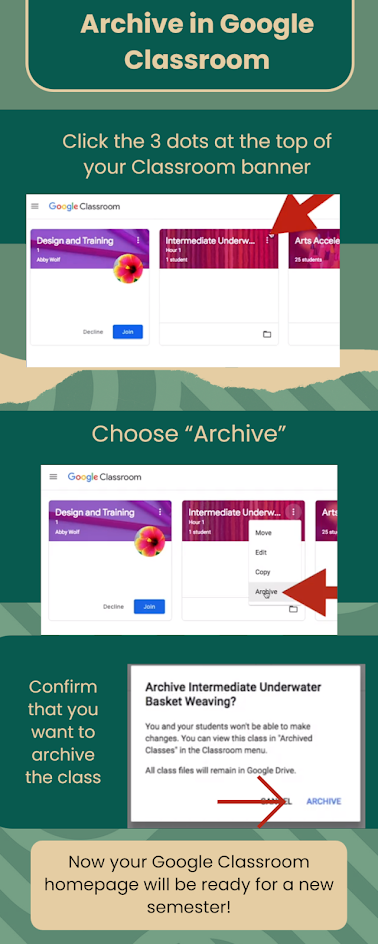
Google Classroom When you have finished teaching a class (either at the end of the semester or the end of the year) it’s time to think about your Google Classroom page. You have two options: Delete the class in Google Classroom or Archive it. *Note: you cannot undo deleting a class!  Today we will focus on the Archive feature. When you archive a class in Google Classroom, those classes will disappear from both the students’ Google Classroom page, and from the teachers’. This helps both students and teachers stay organized!  If you are looking for ways to start of the semester with new or different ideas when it comes to your Google Classroom, reach out to your school's Technology and Learning Coach (TLC)!
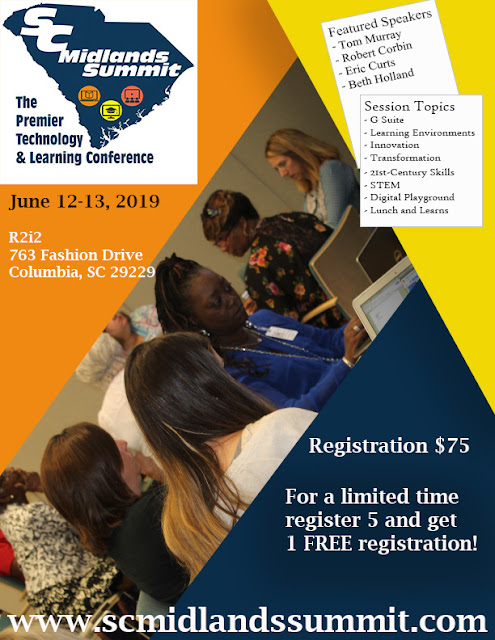
SC Midlands Summit is June 12-13, 2019

Image
Come join us for 2 days of fun and learning. $75.00 for 2 days.  Districts - if you purchase 5 registrations, get the next registration for FREE! Go to www.scmidlandssummit.com for more information.  

Starting Your Class off Right

Image
Starting your class off in a productive way can jump-start a student’s thinking process toward a learning objective/target. “Bell Ringer” activities are usually a short question, problem or task for students to engage in that can either review the previous day’s topic or begin thinking about today’s topic. In a 1:1 digital environment, these bell ringer activities can add more creativity and Google Suite has everything you need to make it relevant and meaningful for the students. I have 4 simple strategies that you can use in any subject that will take between 5-10 minutes to complete. Create a Comic Strip using Google Drawing ELA: Comic Strips are a great way to encourage reading and writing and reinforce key story elements  Have students recreate a scene from a story the layout of comic strips is a useful tool to help students plan a beginning, middle, and end to their story or their interpretation of an event that occurred in the book. Science/Social Studies: Ask a ch...

No Opt Out - using technology

Image
Doug Lemov, author of the acclaimed Teach Like a Champion , suggests a strategy called “No Opt Out.”  He mentions that this strategy or mindset is consistently observed in champion teachers who maintain that expectation is that everyone tries the work presented. Fundamentally, this strategy is a “sequence that begins with a student unable to answer a question should end with the student answering that question as often as possible (even if the student is repeating someone else’s correct answer).” So, we can picture how this might work without technology.  Student A is called upon to answer a question orally, and he gets it wrong.  Student B is called and answers the question correctly.  The teacher then returns to Student A and asks A to repeat B’s answer. But, how might this look using a technology tool?  And why might it be better using technology? In PearDeck , a presentation tool that includes formative assessment slides for students to answer...

Jumping into Google Apps / GSuite

Image
If you are new to Google Apps you may feel like you have a lot of learning to do in order to master all the capabilities of G Suite for education.  There’s good news, though!  First, Google Apps are intuitive and very similar to one another so once you’ve mastered one application, you’ll pick the rest up in no time.  Second, there are multiple opportunities to to brush up on your skills.   Be sure to reach out to your school’s Technology and Learning Coach (TLC) to learn about professional learning sessions on G Suite.   If you prefer to learn on your own, here are a few online learning modules that will help you get to know Google Apps quickly: Google for Education Training Center G Suite Learning Center Switching from Microsoft GCF Learn Free Lynda.Com Free courses with your Richland County Library Card